Posts

To check host to IP or IP to host

Image
Suddenly a requirement came to me that whether the IP address is published over the net or outside network or not. Then for a quick solution , instead of going into the server apache configuration files , i found that there are many sites available over the internet which can provide IP to HOST or HOST to IP resolution so if it will resolve to my IP then it is published over the net.So this cheeky solution worked.

Cannot open shared object file: No such file or directory - HTTP Server not started

Image
1) Installing OHS on Red Hat Linux 4.0 on virtual VMWare , faced a problem that http server not gettng started and threw below error. 10/01/28 11:15:14 Start process -------- /data1/oracle/app10gR3/ohs/ohs/bin/apachectl startssl: execing httpd /data1/oracle/app10gR3/ohs/ohs/bin/httpd: error while loading shared libraries: libdb-3.3.so: cannot open shared object file: No such file or directory. 2) Found that on blogs that libdb-3.3.so is an OS (RED HAT) library file which is missing. 3) Found on the google the link . i.e. ftp://mahe.inrialpes.fr/linux/freshrpms/redhat/7.0/updates/i386/db3-3.3.11-6.i386.rpm Now the link will not work so replace ftp with http , and download it. 4) Executed RPM 5) Retry the installation & http server will start successfully

Some Java Terms used Building applications to be deployed on OC4J

Some Important Java Terms you can come across while working & monitoring SOA Suite :- BPEL Versioning :- Oracle BPEL Control is also useful for deciding when a process is ready for production mode. For example, assume that you compiled and deployed version 1.0 of your BPEL process and subsequently a newer version, version 2.0. After testing and verification of your BPEL process, you can use Oracle BPEL Control to mark one of the versions as the default. Then new instances are started using this definition. The Java Database Connectivity (JDBC) :- The Java Database Connectivity (JDBC) API is the industry standard for database-independent connectivity between the Java programming language and a wide range of databases – SQL databases and other tabular data sources, such as spreadsheets or flat files. The JDBC API provides a call-level API for SQL-based database access. JDBC technology allows you to use the Java programming language to exploit "Write Once, Run Anywhe...

OPATCH_PLATFORM_ID=0 : OPatch failed with error code 73

Usually platform id is picked up from the file : $ORACLE_HOME/inventory/ContentsXML/oraclehomeproperties.xml To override the value :- Set :- OPATCH_PLATFORM_ID export OPATCH_PLATFORM_ID=0 set OPATCH_PLATFORM_ID=0

Authentication error - The administrator password is not same for all OC4J

This problem comes when we try to access any OC4J instances other than HOME, the Application Server will deny the access and gives following error on the screen: Unable to make a connection to OC4J instance instance_name on Application Server application_server_name. A common cause for this failure is an authentication error. The administrator password for each OC4J instance in the Cluster must be the same as the administrator password for the OC4J instance on which Application Server Control is running. This means that all the OC4J instances in the application server should have same oc4jadmin password. Perform below steps to debug the above error :- Before changing the oc4jadmin password for HOME instance, change the oc4jadmin password for all other instances using the following steps: 1. Click on OC4J instance 2. Click on Administration tab 3. Edit sub-task Security Providers under Security task 4. Edit any application name under Application Level Security ...

Upgrade Oracle Application Server to 10.1.3.4 (10g R3 patchset 4)

Image
Overview of applying Oracle Application Server 10g R3 patchset 4 (10.1.3.4) on existing 10g R3 (10.1.3) Key Points for 10.1.3.4 Upgrade 1. Patch Number for OAS 10g R3 patchset 4 (10.1.3.4) is 7272722 2. 10g R3 patchset 4 (10.1.3.4.0 - 7272722) is cumulative and includes all fixes from 10.1.3.0, 10.1.3.1, 10.1.3.2 and 10.1.3.3 3. 10g R3 patchset 4 (10.1.3.4.0) is NOT complete software, you need to install in on top of one of existing software i.e. 10.1.3.n (10.1.3.0, 10.1.3.1, 10.1.3.2 or 10.1.3.3) 4)10g Rel 3 patchset 1 (10.1.3.1.0) is starting point for Oracle SOA Suite (BPEL, ESB…) and 10g Rel 3 patchset 2 (10.1.3.2.0) is starting point for WebCenter Suite (ContentDB, WebCenter Services). If you are using Oracle SOA Suite or Oracle Web Center then you need to do additonal steps before upgrade like – upgrade_10131_10134_oracle.sql (10.1.3.1) or – upgrade_10133_10134_oracle.sql (10.1.3.3) (For BPEL from ORABPEL schema) – upgrade_10133_10134_oracle.sql (For ESB from O...

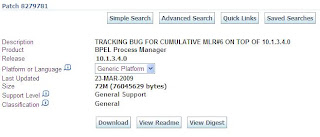
How to apply MLR6 on SOA SUITE 10.1.3.4 .

Image
1) Set ORACLE_HOME,OPATCH/bin under PATH. 2) Shut down the application server by $opmnctl shutdown command 3) Extract the MLR6 on the server & move inside the directory. 4) Execute below command :- bash-3.2$ ./opatch apply /u01/data/8279781/ Oracle Interim Patch Installer version 1.0.0.0.58 Copyright (c) 2007 Oracle Corporation. All Rights Reserved.. We recommend you refer to the OPatch documentation under OPatch/docs for usage reference. We also recommend using the latest OPatch version. For the latest OPatch version and other support related issues, please refer to document 293369.1 which is viewable from metalink.oracle.com Oracle Home : /u01/app/OAS/10.1.3.1/OH Oracle Home Inventory : /u01/app/OAS/10.1.3.1/OH/inventory Central Inventory : /home/appsoad/oraInventory from : /var/opt/oracle/oraInst.loc OUI location : /u01/app/OAS/10.1.3.1/OH/oui OUI shared library : /u01/app/OAS/10.1.3.1/OH/oui/lib/hpunix/liboraInstaller.so Java locatio...